Can you export Webflow templates and use them with another CMS?
.webp)
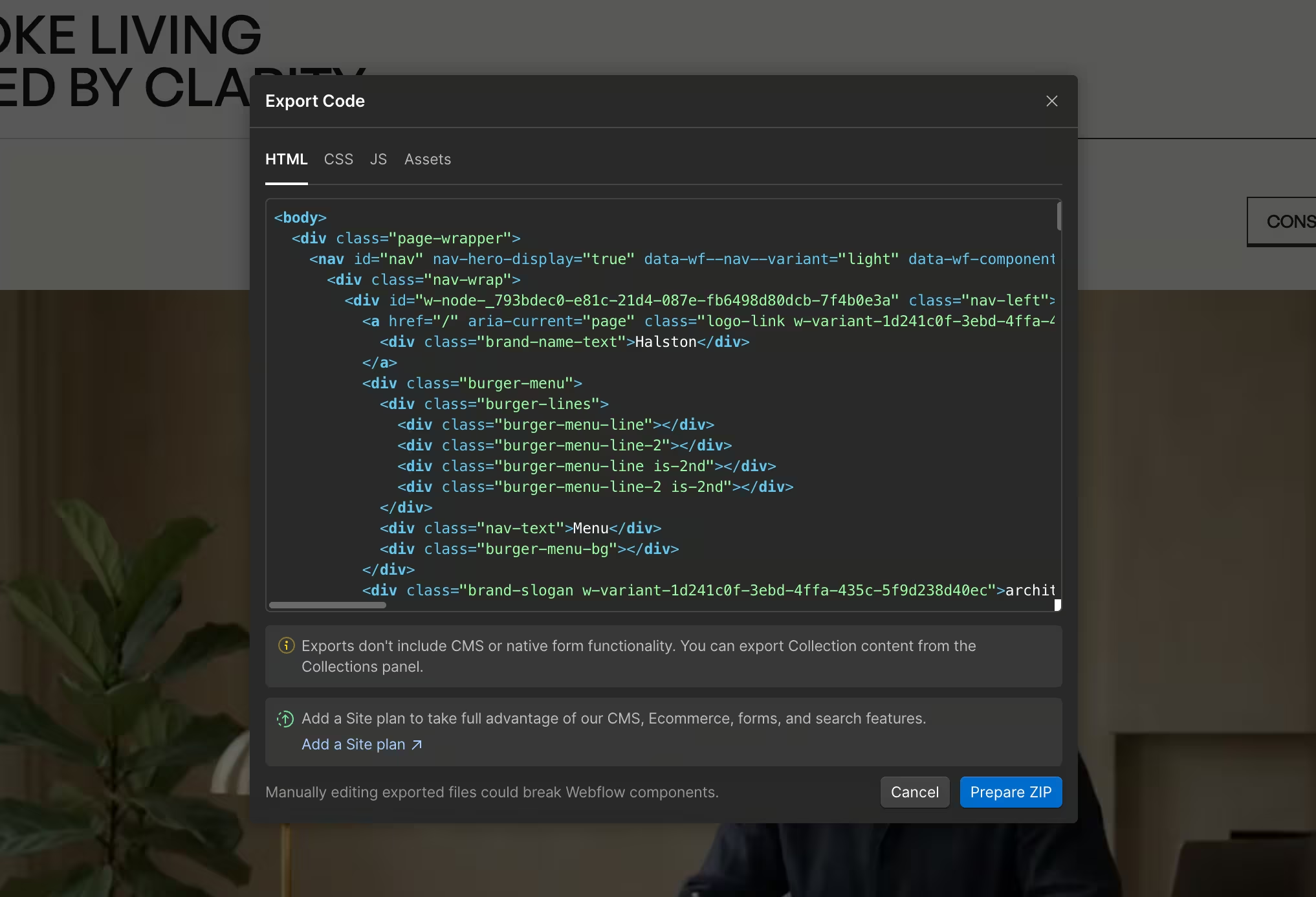
Yes. Metrik’s Webflow templates can be exported as HTML, CSS and JavaScript, hosted on your own server, and adapted to another CMS. The export includes the frontend code (HTML, CSS, JS, assets), but not Webflow CMS content or hosted services such as form processing. Connecting another CMS requires development work.
Here are the answers to the questions I receive most often.
What exports and what needs replacing?
- HTML, CSS and JavaScript: The frontend code is included in the export and can be hosted on your own server, as covered in Webflow’s own export documentation.
- Responsive layouts and animations: These work after export, including native GSAP interactions, when you preserve the required styles, scripts and element structure.
- CMS content: Collection content and Webflow CMS functionality do not transfer. The export includes styles and empty Collection page templates. Rebuild CMS sections as static content or connect them to your own CMS.
- Forms: The form design remains, but submission processing requires your own backend or a third-party form service.
- Search and Ecommerce: Webflow’s site search, product database and checkout functionality need replacement solutions.
- Localization: Secondary language versions created through Webflow Localization are not included. You can build separate static language pages or manage translations in your own CMS.
- Another CMS: The export is not a ready-made theme for another platform. A developer needs to adapt the exported layouts and connect them to your content.
Do I need Webflow Hosting?
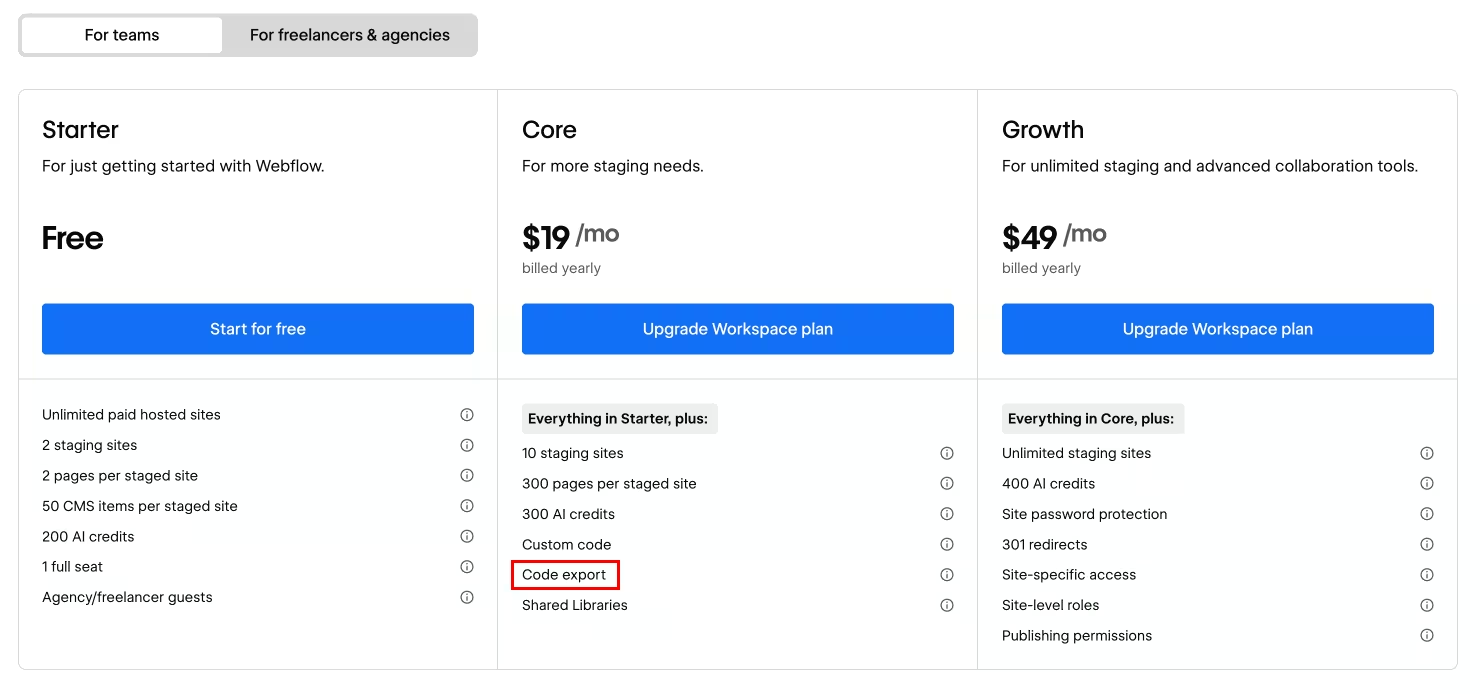
No. Code export requires an eligible paid Workspace plan, not a Site plan. You can subscribe for just one month and export your code during that period.
You need an active eligible plan for each future export, but an already exported website can run on your server without a Webflow subscription.
Will the design and animations still work?
The templates use native Webflow layouts, responsive breakpoints and interactions. These continue working after export when you preserve the required styles, scripts and element structure. This also applies to templates with native GSAP interactions.
Keep all required script references and test the website on your server. Self-hosting does not automatically mean every script or font is loaded locally.
Can I use another CMS?
Yes, but the export is not a ready-made theme for another platform. A developer needs to adapt the exported layouts and connect them to your CMS.
For templates using Webflow CMS, Collection content is not included in the standard code export. However, the export includes styles and layout code, including empty Collection page templates.
You can rebuild CMS sections as static content before exporting or connect them to content in your chosen CMS.
If you are new to Webflow in general, my guide to using Webflow templates covers the difference between static and CMS content before you get to export.
Can I easily change the branding?
My templates use global variables and reusable components to simplify common changes. The exact setup varies by template, and some sections have individual styling.
You can adjust colors, typography and spacing in Webflow before exporting. You can also replace the fonts with your own self-hosted webfonts; check their licence and review the layout afterward.

What needs replacing on external hosting?
Webflow form processing needs your own backend or a third-party form service. If your chosen template uses Search, Ecommerce or Localization, those Webflow services do not transfer through standard code export.
CMS content does not transfer either, but the styles and layout code do. You will probably want to replace the content with your own anyway, so I do not see this as an obstacle. Just account for the work needed to connect it to your CMS.
Can I create separate language versions?
Yes. You can manually build static pages under folders such as /de/ and /en/. Each language version needs its own content and maintenance.
Create these as ordinary pages in the project's primary locale. Secondary versions created through Webflow Localization are not included in standard code export.
What about the licence?
You can export the template and host it on your own server without attribution to Webflow. The Single-Use License applies whether the template is hosted on Webflow, another server or your own computer.
You can use a Paid Template for only one person/business/project. If you want to use the purchased template for a different client or project, then you'll have to buy another license (by buying the template again). You can customize the template to any degree (adding, altering, or removing text, images, graphics, layout, design, etc.) to fit your project's needs.
Marketplace Template Licenses information
What workflow do I recommend?
Finish the design and branding in Webflow first. Prepare static content or plan the external CMS integration. Then export the website and use it with your own CMS. Once your content and forms are connected, test everything on your server.
For future updates, keep Webflow as your design source. Keep external integration changes separate so a fresh export does not overwrite them.
This workflow is suitable if you have technical experience or a developer helping you.
Explore more templates
Every template in the Metrik Webflow templates catalog ships as a real, exportable Webflow project, not a locked-in theme. Browse the full collection, or get them on the Webflow Marketplace.